







Your practice day on one board — instead of in someone's head
A calendar answers the question “when”. During a running day, a different one matters more: “how far along”. Who is already in the waiting room? Who is in treatment right now? Who still needs to pay? Today those answers usually live in one person’s head — and that person is busy with an animal.
That is what the Flow Board is for.
The day as a board
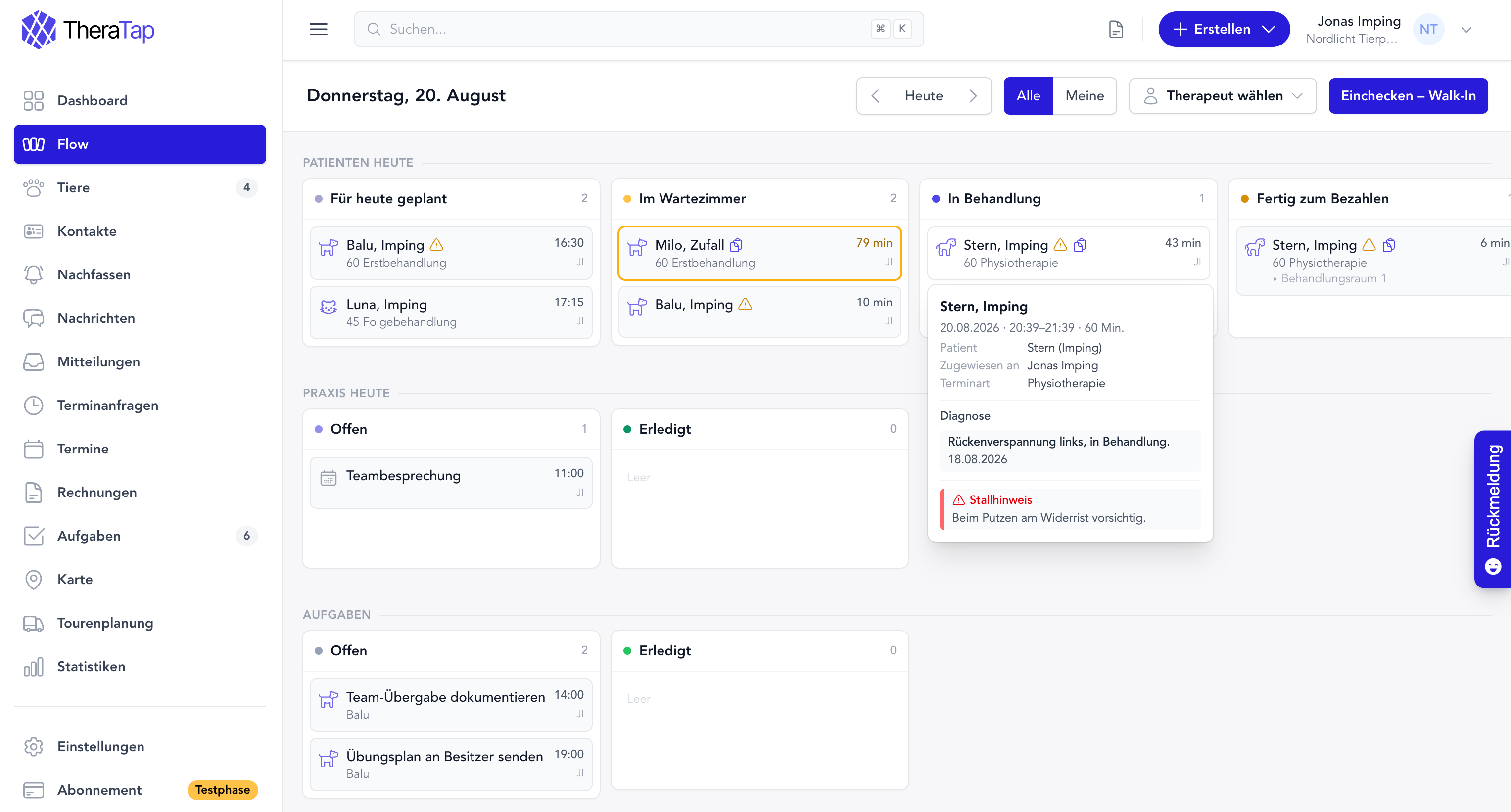
The board lays your practice day out in columns: what is still ahead on the left, what is finished on the right. Every appointment is a card that travels from column to column — Planned for today, In the waiting room, In treatment, Ready to pay, Done.
One glance is enough. And because everyone sees the same board, nobody has to ask whether Mrs Meier has arrived yet.
Who is waiting, and for how long?
In the columns where people wait, each card shows the time spent there instead of a clock time: “8 min”, “77 min”. Every column can carry a warning threshold — once it is passed, the card is highlighted.
That is exactly the moment that otherwise slips past: someone has been sitting in the waiting room for an hour and nobody noticed.
No appointment? Check them in directly
When someone drops by, there is no detour through the calendar. Check in – walk-in, pick the animal or the owner, done — the card sits in the waiting room and the appointment exists.
Tasks belong on the board too
Below the appointments, the board shows the tasks due today, in the same two columns as everything else: Open and Done. Checking one off means dragging it to the right. Anything still open from earlier days appears clearly marked — it does not quietly disappear from view.
What happens by itself
Some steps belong together so clearly that you should not have to confirm them twice:
- In treatment → the record for the appointment is created
- Ready to pay → the services recorded turn into a draft invoice
- In the waiting room → the responsible therapist is notified
- Record completed → the card moves on by itself
Your board, your columns
The default columns fit most practices — but not all of them. Under Settings → Flow Board you add your own columns, change names, colours, order and time display, or hide what you do not currently need. Mobile teams start with a leaner set than a practice with a waiting room.
Columns with a fixed role in the run of the day are protected: renaming and reordering yes, deleting no — the automations depend on them.
The start page of your choice
If you work on the board all day, you should not have to click your way there after signing in. Under Settings → Start page you choose for yourself whether the dashboard or the Flow Board appears — and whether the board starts on All or Mine.
You will find the Flow Board in the main menu from today. All the details are in the documentation.