







Choose when TheraTap keeps you informed about your appointments
You work on a team and get appointments assigned – but not every change needs to land in your inbox right away. From now on, you decide when TheraTap notifies you about your appointments by email.
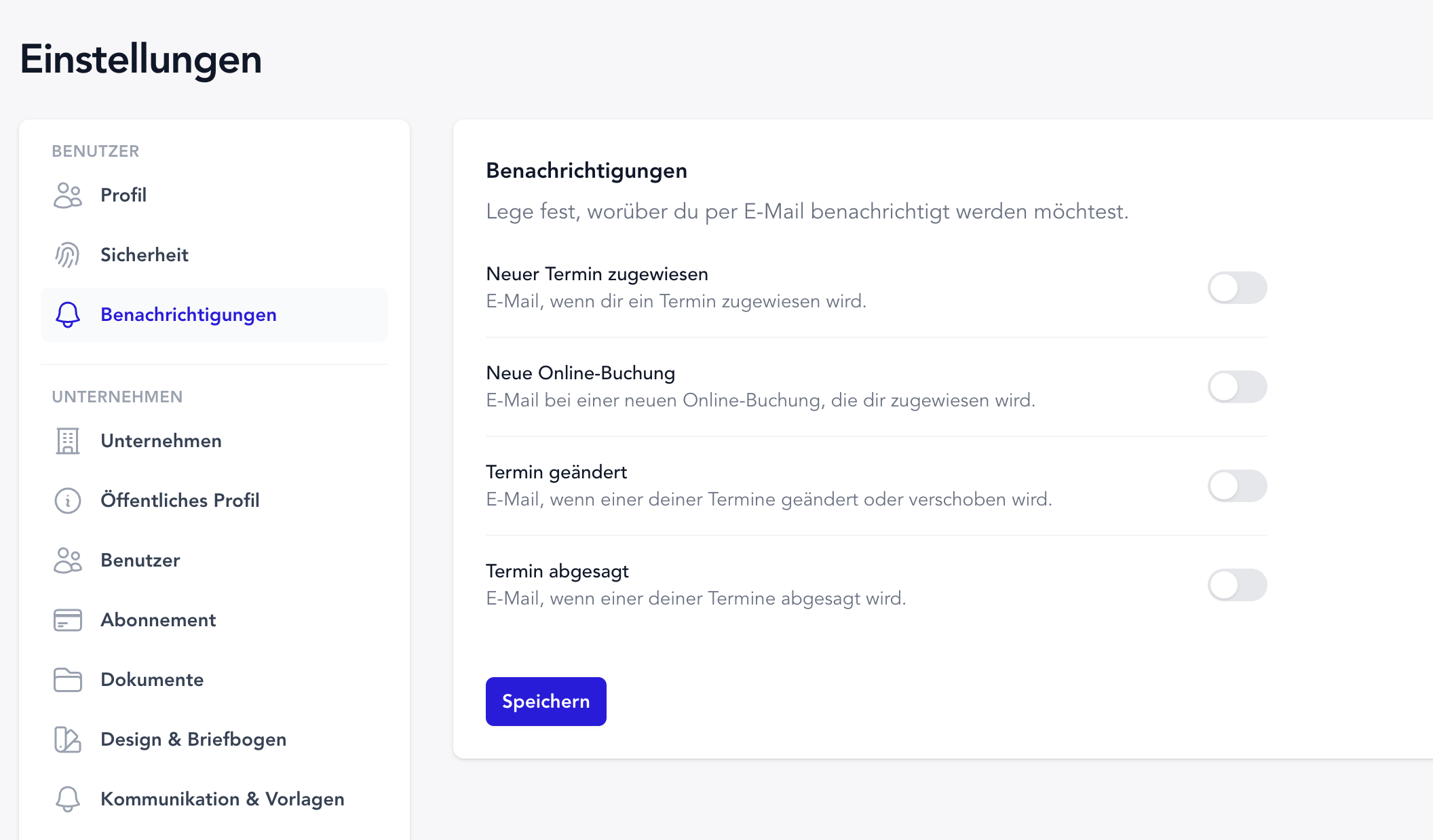
Under Settings → Account → Notifications, you can turn four types of appointment emails on or off:
- New appointment assigned – when someone assigns you an appointment in the calendar
- New online booking – when a booking comes in via the online calendar for you
- Appointment changed – when an appointment is rescheduled or edited
- Appointment cancelled – when an appointment is cancelled
Straight to the appointment
Every email includes the key details at a glance: date, time, treatment type, patient, and contact – plus a button that takes you directly to the appointment in the calendar. The email language follows your personal TheraTap settings.
Only what concerns you
You’re notified exclusively about appointments assigned to you. If you create an appointment and assign it to yourself, no extra email is sent – that would be redundant.
New to the team? All four notifications are enabled by default. Existing users start with all toggles off so nothing changes until you actively turn something on.
Not the same as customer messages
This setting only affects emails to you as a staff member. What animal owners receive by email or SMS (confirmation, reminder, etc.) is still configured under Communication & Templates.
All the details in the documentation →
Questions or feedback? Get in touch — we’d love to hear from you!