Online booking without dead gaps – the way your practice day actually runs
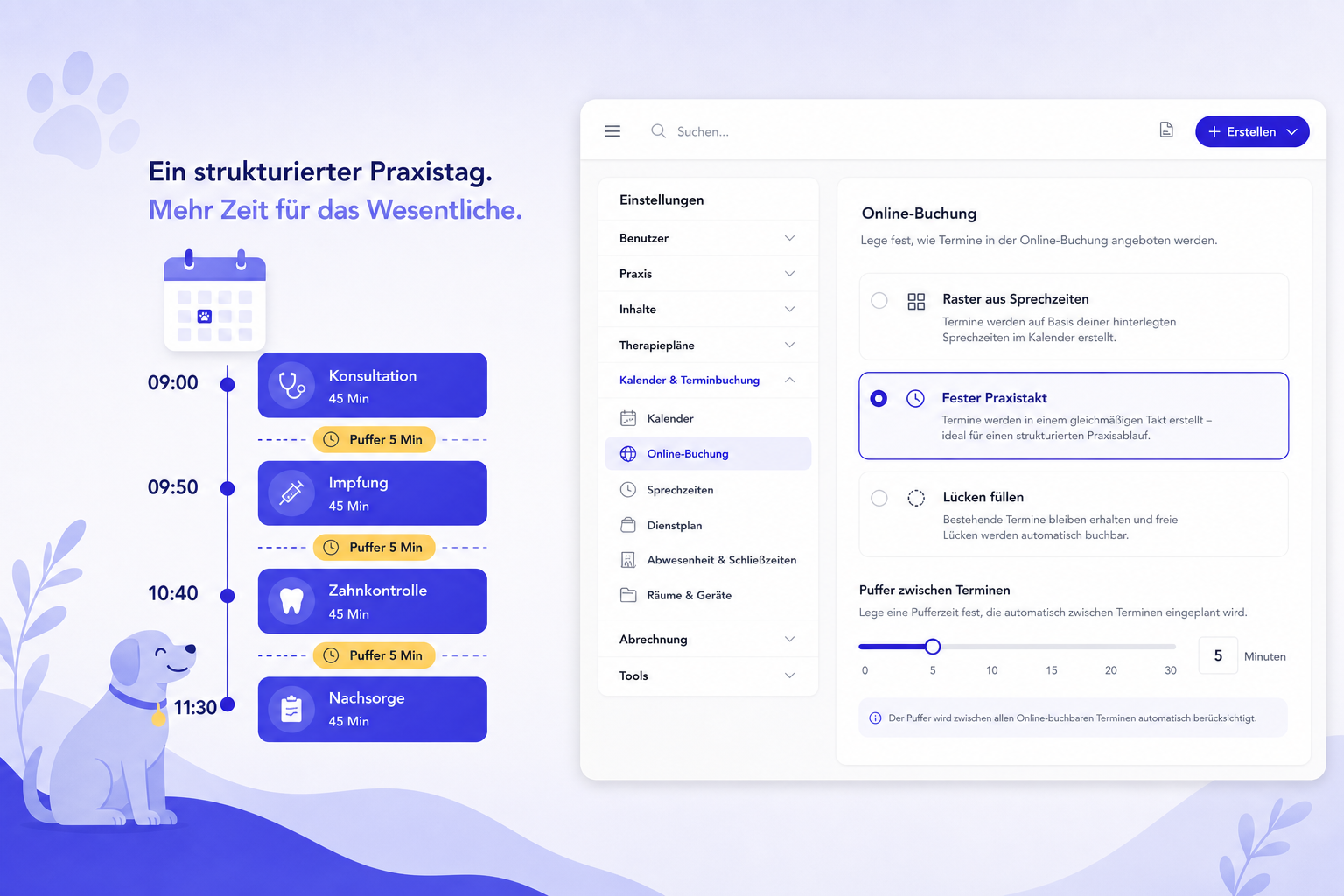
Free time between appointments that still isn’t bookable online is frustrating — especially in solo practices that run a clear rhythm (e.g. 45 minutes treatment + 5 minutes buffer). That’s why Settings → Online booking now includes the Online slot pattern.
Three modes — you choose
| Mode | When it helps |
|---|---|
| Working hours grid | As before: starts follow your opening-hours slot interval (15/30/45/60 min). Default for existing practices — nothing changes until you switch. |
| Fixed practice rhythm | Starts every treatment + buffer from opening-hours start. Example: 45 + 5 → 10:00, 10:50, 11:40 … |
| Fill gaps | Next slot right after appointment end + buffer when the gap is large enough. Ideal when cancellations or off-grid appointments leave holes. |
Practice example
An appointment ends at 15:00, buffer 5 minutes, treatment 45 minutes → the next bookable start is 15:05.
If someone books 09:00, the same day continues (with gap fill / fixed rhythm) as 09:50, 10:40, 11:30 … — without colourful mid-gap starts that only create leftover scraps.
Important: a 90-minute window (13:00–14:30) fits one full 45-minute treatment — not two. 14:00–14:45 would collide with 14:30. TheraTap only offers slots that physically fit.
How to set it up
- Open Settings → Online booking
- Choose the matching mode under Online slot pattern
- Set the time window buffer (e.g. 5 minutes)
- Save and optionally check the calendar preview
Treatment duration still comes from your therapy types — together with the buffer, that becomes your practice rhythm.
More utilisation. Fewer dead gaps. Online booking that matches real practice days.
Read the guide: Online slot pattern →
Questions or feedback? Contact us — we’d love to hear from you!