







Dictate, digitize, summarize, invoice – where the AI takes work off your hands in daily practice
Most of the time in daily practice is not lost during the treatment, but afterwards: typing up findings, sorting notes, writing reports, gathering invoice items. That is exactly where the AI in TheraTap comes in. Since quite a bit has accumulated by now, there is a dedicated page with all AI features – and here is the overview.
To the overview of all AI features →
1. Dictate findings instead of typing them up
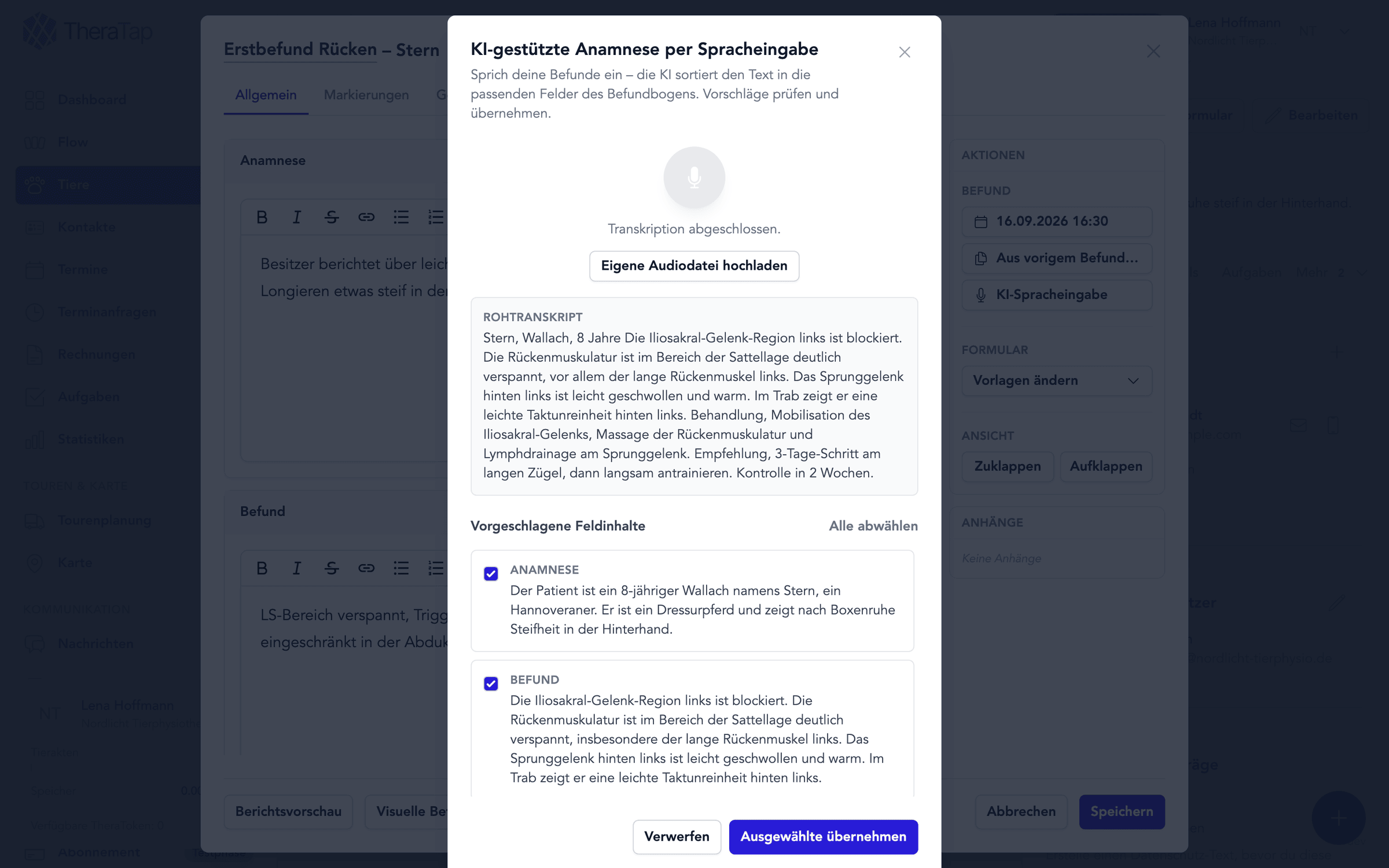
With the AI voice assistant, you dictate your findings right after the treatment. TheraTap converts the recording to text and suggests which statement belongs in which field of your assessment form – history, findings, palpation or recommendation. You review and accept with one click. It works in nine languages and with the specialist vocabulary of animal physiotherapy, animal naturopathy and veterinary medicine.
You will also find the AI microphone in TheraTap’s text fields. You can even fill in document templates such as feeding plans or consent forms by voice.
2. Digitize paper assessment forms in seconds
Do you have a tried-and-tested assessment form on paper? With form import, you upload it as a PDF or photo. The AI recognizes sections, text fields, checkboxes and selection lists and builds a digital form from them. You review the suggestion in the form editor and only save once everything is right. It works for assessment forms just as well as for medical history forms that you send to your clients.
3. The entire medical history in one text
After many appointments, the findings history gets long. The AI summary condenses all of an animal’s findings into an easy-to-understand text – to read in TheraTap or directly as a PDF for veterinarians and clinics.
4. Invoice draft with one click
Invoice with AI searches all appointments, treatments and notes since the last invoice and suggests matching line items. Prices and tax rates come exclusively from your article catalog – the AI does not invent prices.
5. Findings that pet owners understand too
In the MeinTier app, your clients see the findings you release. With MeinTier Premium, the AI explains every finding in plain language, and the AI assistant Malina answers questions about their own animal. This incurs no costs for your practice.
The AI suggests – you decide
All AI features follow the same rules: results appear as a suggestion, everything remains editable, and content is only sent to the AI service when you actively use an AI feature. Professional responsibility stays with you.
How to try it out
All AI features for your practice are part of the AI add-on, which you add to your plan. They are included free of charge during the 14-day trial.