Progress in degrees
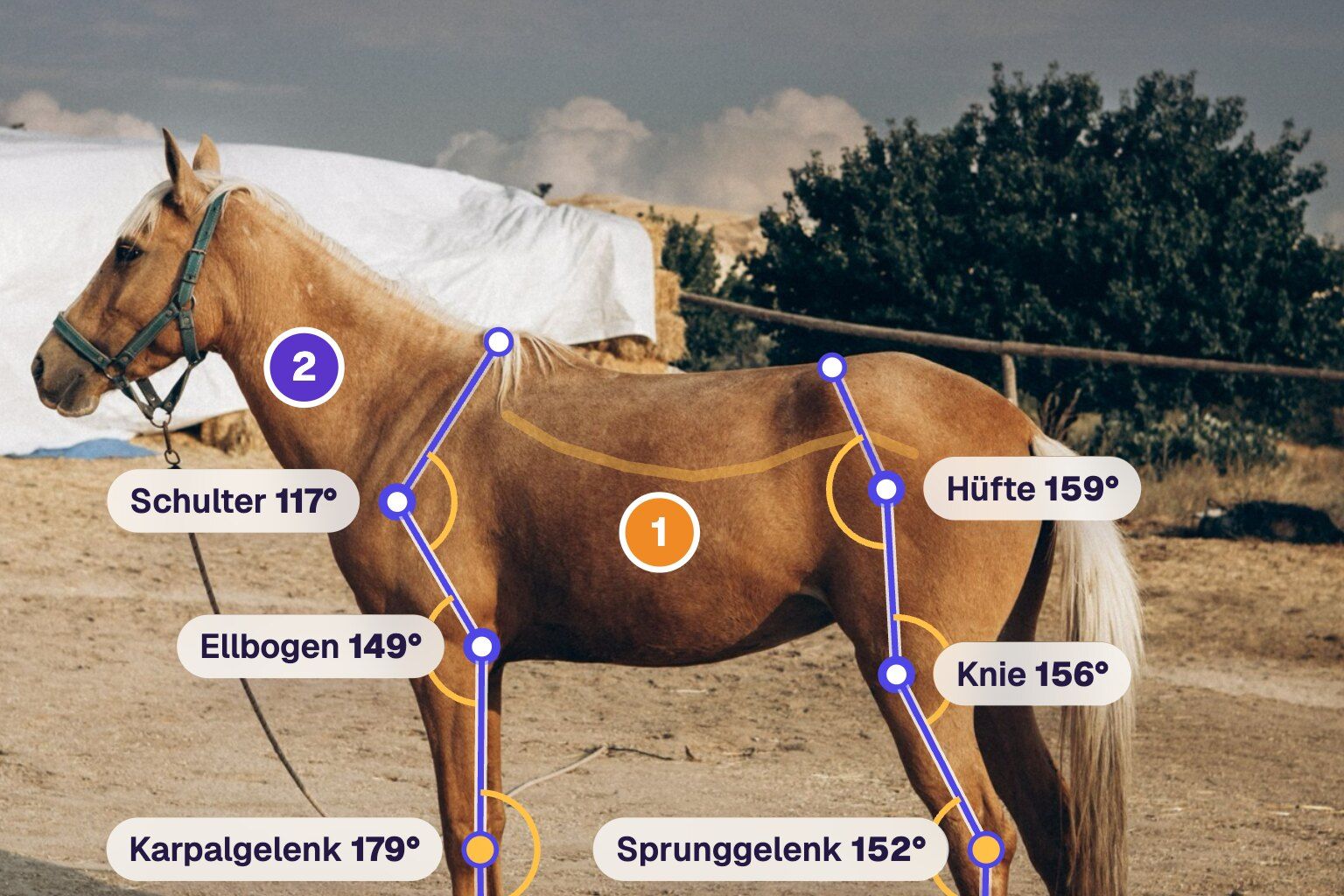
During an assessment you see straight away that an animal stands differently than last time. The owner often only sees it once you show them. Now you show it on a photo, in degrees.
Add a photo, draw on it
In the record, switch from Body map to Images at the top, or use the Images section on a phone. Take or choose a photo and work on it with the same tools as on the body map:
- Place numbered markers, with the note right below the image
- Draw with a pen or arrow in five colours
- Measure angles: shoulder, elbow, carpus, hip, stifle, hock or a custom angle. Drag three points, upper, joint, lower, and the angle shows at the joint right away.
Several images per record are no problem, for example left and right side. Everything saves automatically.
AI measures along
With the AI module, Angle shows an AI: calculate angles button. The AI looks for the joints on the photo and sets the angles as a suggestion. You check the points and adjust them where needed. The AI gives you a starting point, not a measurement. It works best with a side view: the animal stands square, the camera at joint height.
Make progress visible
If the previous record has an angle with the same name, the change shows right next to it, for example “before 112° (+5°)”. You see at a glance whether posture changes over the course of treatment.
In the record PDF
The record PDF shows each image with drawing, angles and markers, followed by tables of the angles and marker notes. To keep an image out of the owner report, remove it under Manage structure.
All steps are in the guide to images in records.